Knowledge Base
What is enterprise resource planning for SMEs?
Discover what enterprise resource planning is and how it can unify processes for SMEs. Streamline operations and support growth effectively.

What is enterprise resource planning for SMEs?
Enterprise resource planning (ERP) is defined as integrated software that centralises an organisation’s core business processes, including finance, HR, supply chain, and procurement, into a single unified system. Rather than managing a collection of disconnected spreadsheets and point solutions, your business operates from one single source of truth that supports real-time decision-making across every department. For small and medium enterprises (SMEs) looking to scale without adding operational complexity, ERP is the foundational technology that makes that possible. Understanding what enterprise resource planning delivers, and how to adopt it well, is one of the most consequential decisions an SME leadership team will make.
What is enterprise resource planning and how is it structured?
ERP is integrated software centralising data from departments such as finance, manufacturing, HR, and customer relationship management into one unified platform. Each department draws from the same central database, which means a purchase order raised in procurement automatically updates inventory levels and triggers the relevant accounting entries. No manual re-entry. No version conflicts between teams.
The system is built around modules, each serving a distinct business function. Common modules include financial accounting, accounts payable and receivable, inventory management, manufacturing and production, procurement, human resources, payroll, and CRM. The modular design enables tailored deployments, meaning an SME in professional services can activate finance, HR, and CRM modules without paying for manufacturing functionality it does not need.

The table below compares a modular ERP approach against the typical stand-alone software stack many SMEs start with.
Business function | Stand-alone software approach | ERP module approach |
|---|---|---|
Finance and accounting | Separate accounting software | Integrated finance module with live data |
Inventory management | Spreadsheet or basic stock tool | Real-time inventory linked to procurement |
Human resources | Stand-alone HR platform | HR and payroll module sharing employee data |
Customer management | Separate CRM tool | CRM module connected to sales and finance |
Reporting | Manual exports and consolidation | Centralised dashboards with live data feeds |
Pro Tip: Start with two or three core modules that address your biggest operational pain points, then expand the ERP footprint as your team builds confidence with the system.
What are the benefits of ERP systems for SMEs?
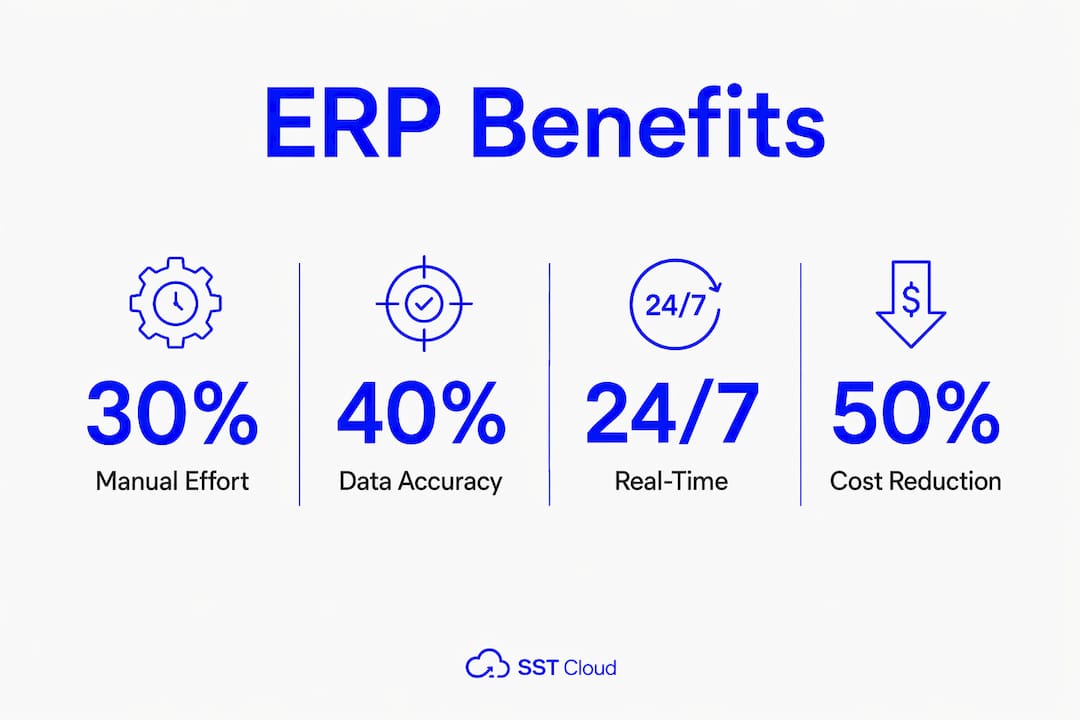
The benefits of ERP systems extend well beyond replacing spreadsheets. For SME decision-makers, the case for ERP rests on measurable improvements across efficiency, cost, security, and growth capacity.
Reduced manual effort. ERP automates repetitive tasks such as invoice processing, payroll calculations, and stock reordering. Teams spend less time on data entry and more time on work that drives revenue.
Improved data accuracy. A single central database eliminates the duplication and inconsistency that plague multi-system environments. When finance and operations share the same data, reporting becomes reliable.
Better decision-making. Real-time dashboards give leadership teams visibility into cash flow, inventory levels, and workforce capacity without waiting for end-of-month reports.
Cost savings. Cloud ERP removes the need to manage local servers and reduces the infrastructure and IT maintenance costs that weigh on SME budgets.
Improved data security. ERP consolidates scattered information and reduces vulnerabilities to data loss and unauthorised access. Storing data across multiple disconnected systems creates more attack surfaces, not fewer.
Mobility and remote access. Cloud ERP supports access from any internet-connected device, which is particularly valuable for SMEs with distributed or hybrid teams.
Scalability. As your business grows, ERP scales with it. Adding new users, locations, or business units does not require replacing the system from scratch.
Security deserves particular attention. Many SMEs underestimate how much risk sits in fragmented local data storage. Consolidating that data into a governed, cloud-hosted ERP environment directly reduces that risk.
Pro Tip: If your leadership team is hesitant about cloud ERP, frame the conversation around data security first. Security is often the primary driver that moves organisations from on-premise tools to cloud ERP platforms.
How does an ERP system work to integrate business processes?
ERP works by placing a central database at the core of the organisation. Every department, whether finance, HR, or operations, reads from and writes to that same database. When a sales order is created, the system automatically checks inventory, updates the warehouse, schedules production if needed, and records the revenue entry in the general ledger. That chain of events happens without manual handoffs between teams.
ERP automates business processes and provides internal controls by linking data flows in real time, which improves accuracy and reduces the manual effort that typically introduces errors. The result is that decision-makers receive reliable, current information rather than reports assembled from multiple sources hours or days after the fact.
The table below outlines the key differences between on-premise and cloud-based ERP deployments, which is a common decision point for SMEs evaluating enterprise planning solutions.
Characteristic | On-premise ERP | Cloud ERP |
|---|---|---|
Infrastructure | Managed internally, requires servers | Hosted by vendor, no local hardware |
Upfront cost | High capital expenditure | Lower upfront, subscription-based |
Maintenance | Internal IT team responsibility | Vendor-managed updates and patches |
Remote access | Limited without VPN configuration | Available from any internet-connected device |
Scalability | Requires hardware upgrades | Scales on demand |
Implementation time | Typically longer | Generally faster to deploy |
Cloud-based ERP has become the standard deployment model for SMEs precisely because it removes the infrastructure burden. Your team accesses the system through a browser, the vendor manages security patches and uptime, and you pay a predictable monthly fee rather than a large capital outlay. For SMEs without a dedicated IT department, that model is far more practical than managing on-premise servers.
Real-time reporting is one of the most underappreciated capabilities of a well-configured ERP. Rather than waiting for a finance team member to compile a monthly report, leadership can view live cross-system business intelligence at any point during the month and act on it immediately.
What should SMEs consider when adopting and maintaining ERP?
ERP adoption is not a technology project. It is an organisational change programme that happens to involve technology. SMEs that treat it purely as a software installation consistently underperform against those that invest in process design, data preparation, and staff capability.
Key considerations before and during ERP adoption include:
Data cleansing before migration. Thorough data cleansing before migration is critical. Importing inconsistent or duplicate legacy data into a new ERP system does not fix the problem. It embeds the problem into your new system and undermines the efficiency gains you were expecting.
Change management and training. Underestimating the human side of ERP implementation is the most common reason projects stall. Staff need structured training, clear communication about why processes are changing, and time to build confidence with the new system.
Process mapping before configuration. Configure the ERP to match your actual business processes, not the default workflows shipped with the software. That requires mapping your current processes first and identifying where they need to change.
Selecting a system that fits your growth trajectory. Choose an ERP that can accommodate your business two or three years from now, not just today. Switching systems mid-growth is expensive and disruptive.
Ongoing maintenance and audits. ERP is a living system requiring continuous maintenance, updates, and process audits. Business needs evolve, and the ERP configuration must evolve with them. A system that was well-configured at go-live can drift out of alignment within 18 months if no one is actively managing it.
Integration with existing tools. Identify which existing tools, such as payroll platforms or e-commerce systems, need to connect with the ERP and confirm integration capability before committing to a vendor.
The data cleansing phase is consistently underestimated. Most SMEs discover during migration that their legacy data contains far more inconsistencies than expected. Allocating dedicated time and resources to data normalisation before go-live is not optional. It is the difference between a system that delivers value from day one and one that creates new problems.
Pro Tip: Treat your ERP as a living system. Schedule a formal process audit every six months for the first two years after go-live. Review whether the system configuration still matches how your business actually operates, and update it where it has drifted.
Key takeaways
Enterprise resource planning delivers the most value when SMEs treat it as an ongoing operational platform rather than a one-time software installation.
Point | Details |
|---|---|
ERP centralises business data | A single database connects finance, HR, inventory, and CRM for real-time visibility. |
Modular design suits SMEs | Activate only the modules your business needs and expand as you grow. |
Cloud ERP reduces infrastructure cost | Vendor-managed hosting removes the need for on-premise servers and internal IT overhead. |
Data cleansing is non-negotiable | Clean and normalise legacy data before migration to avoid embedding errors into the new system. |
ERP requires ongoing management | Schedule regular process audits to keep system configuration aligned with business evolution. |
ERP as a competitive platform, not just a planning tool
The framing of ERP as “resource planning” undersells what the technology actually does for a growing SME. I have worked with organisations that adopted ERP expecting an efficiency gain and discovered something more significant: a platform that changed how leadership teams made decisions.
The shift from fragmented tools to a unified system does not just reduce manual effort. It changes the quality of information available at the leadership level. When a CEO can see real-time cash flow, current inventory, and open sales orders in a single view, the decisions they make are categorically different from those made from a monthly spreadsheet summary.
Security is the dimension most SME decision-makers underweight. Consolidating data from five or six disconnected systems into a governed cloud environment does not just reduce administrative overhead. It materially reduces the organisation’s exposure to data breaches and compliance failures. That is a board-level risk conversation, not just an IT one.
The SMEs that gain the most from ERP are those that treat it as a strategic technology platform rather than a back-office tool. They invest in configuration, training, and ongoing audits. They connect ERP data to analytics and AI layers to generate deeper operational insight. And they revisit the system regularly as the business changes. That discipline is what separates organisations that get a good return from ERP from those that spend the money and wonder why the results were disappointing.
— Engineering and Growth Manager
How SST Cloud supports ERP and cloud transformation for SMEs
SST Cloud works with SMEs at every stage of cloud and enterprise technology adoption, from initial strategy through to deployment, integration, and ongoing management. For organisations evaluating or implementing ERP, SST Cloud’s digital and cloud transformation services cover the full scope: cloud architecture, application modernisation, data engineering, and managed support across AWS, Microsoft Azure, and Google Cloud Platform.
Whether your organisation is migrating from on-premise infrastructure to cloud ERP, integrating ERP data with analytics platforms, or modernising an existing enterprise technology stack, SST Cloud brings the engineering depth and advisory experience to deliver measurable outcomes. The team specialises in reducing complexity and accelerating the time to value for SMEs investing in enterprise technology. Speak with SST Cloud to understand what a well-executed ERP deployment looks like for your business.
FAQ
What is the ERP software definition in simple terms?
ERP software is an integrated platform that connects an organisation’s core business functions, including finance, HR, inventory, and procurement, into a single system with a shared database. It replaces disconnected tools with one source of accurate, real-time business data.
How does ERP work for a small business?
ERP works by routing data from every department through a central database, so actions in one area, such as raising a purchase order, automatically update related records in finance and inventory. Cloud-based ERP makes this accessible to small businesses without requiring on-premise servers or a large IT team.
What are the main benefits of ERP systems for SMEs?
The primary benefits include reduced manual effort, improved data accuracy, real-time reporting, lower infrastructure costs through cloud deployment, better data security, and the ability to scale the system as the business grows.
How long does an ERP implementation typically take?
Implementation timelines vary based on business complexity and the number of modules deployed. Cloud ERP deployments generally proceed faster than on-premise installations, though data cleansing, process mapping, and staff training add time regardless of the deployment model.
What is the biggest risk in ERP adoption for SMEs?
The most common risk is underestimating the change management and data preparation requirements. Importing poor-quality legacy data and failing to train staff adequately are the two factors most likely to undermine the expected efficiency gains from ERP.