Knowledge Base
Remote team productivity optimisation: 2026 guide
Unlock your team's potential with our 2026 guide to remote team productivity optimization. Boost engagement and reduce turnover today!

Remote team productivity optimisation: 2026 guide
Remote team productivity optimisation is the process of designing workflows, communication rhythms, and performance metrics to maximise output and engagement in virtual teams. Teams that implement structured communication rhythms with 70% async work report 35% higher engagement and 28% lower turnover than those running ad-hoc remote processes. That gap is not accidental. It reflects the difference between teams that operate on a deliberate system and those that simply react to daily friction. This guide gives remote team leaders in small to medium enterprises a practical, research-backed playbook covering async-first communication, outcome-based tracking, meeting design, and the often-overlooked impact of experienced team members on overall output.
What is a remote team operating system and why does it matter?
A remote team operating system (RTOS) is an explicit, measurable system that governs how a team manages workflow, decisions, communication, and tools. The term “operating system” is deliberate. Just as a computer OS coordinates hardware and software, an RTOS coordinates people and processes so work moves without constant managerial intervention.
The core design principle of an RTOS is the synchrony ratio. The target is no more than 40% synchronous work, meaning meetings, live calls, and real-time chat. The remaining 60% or more runs on async communication: recorded updates, written decisions, shared documents, and structured standups. High-performing distributed teams limit synchronous meetings to 8–10 hours per week, compared to a market average of 14.8 hours. Cutting four meeting hours per week recovers roughly 200 productive hours per full-time employee annually.
An RTOS also requires three structural components:
Decision logs: Every significant decision is documented with context, options considered, and the outcome. This eliminates repeated debates and gives new team members instant context.
Knowledge base: A searchable, maintained repository of processes, templates, and team norms. Without this, knowledge lives in people’s heads and leaves with them.
Meeting rationalisation: A standing audit of recurring meetings, with a clear owner and purpose for each. Any meeting without an agenda is cancelled or converted to async.
Pro Tip: Start with a minimum viable RTOS: one async standup tool, one decision log, and one weekly team review. Iterate every 30 days based on what the team actually uses.
How can leaders measure remote team productivity effectively?
The most common mistake in remote performance management is measuring activity instead of outcomes. Tracking keystrokes, time online, or hours logged creates distrust and gaming behaviour. Teams learn to look busy rather than produce results. Outcome-based frameworks, by contrast, measure weekly deliverables, OKRs, and decision velocity, which is the time from a question being raised to a documented decision, with a target of under 48 hours.

Outcome-based metrics outperform activity-based measurement on both productivity and morale. The practical difference shows up in what managers review each week.
Metric type | Examples | Strength | Weakness |
|---|---|---|---|
Activity-based | Keystrokes, hours online, login time | Easy to collect | Measures presence, not output |
Outcome-based | Weekly deliverables, OKRs, decision velocity | Measures real work | Requires clear goal-setting upfront |
Three system health metrics give managers an early warning signal without surveillance:
Average meeting hours per person: Target below five hours per week for individual contributors.
Async standup completion rate: Target above 90%. A drop signals disengagement or tool friction.
Tool count: More than six active tools per team is a reliable predictor of context-switching overload.
Run a cadence review every four weeks. Ask the team what is slowing them down, what is working, and what can be removed. The review itself should take no more than 30 minutes and produce at least one concrete change.
What tactical steps improve communication and collaboration for remote teams?
Knowledge workers attend 25.6 meetings weekly and switch work contexts 5.1 times daily. Both figures directly reduce the time available for deep, focused work. The fix is not a new tool. It is a communication architecture that protects focus time by design.
The recommended communication structure for remote teams follows this sequence:
Set a 70/30 async-to-sync ratio. Seventy percent of communication happens in writing: async standups, recorded updates, and documented decisions. Thirty percent happens live: weekly team reviews, 1-on-1s, and client calls.
Define response-time agreements. A clear response-time standard, such as Slack messages answered within four hours and emails within 24 hours, removes the anxiety of waiting without requiring anyone to be always online.
Require agendas for every meeting. No agenda means no meeting. Rotate the facilitator role so one person does not carry the cognitive load of running every session.
Cap meeting hours at 10 per week per person. This is a hard ceiling, not a guideline. Schedule blocks in the calendar to enforce it.
Protect two or more hours of daily deep-focus time. Block this time in every team member’s calendar. No meetings, no Slack notifications, no exceptions during that window.
Consolidate tools and enforce channel hygiene. Each communication channel needs a defined purpose. Project updates go in one place. Social conversation goes in another. Mixing them creates noise that buries important information.
Pro Tip: Create an escalation channel with a defined SLA, such as a two-hour response for genuinely urgent issues. This removes the justification for interrupting deep-focus time with “quick questions.”
How do experienced teammates influence remote team productivity?
Experienced team members are the most underutilised productivity asset in most remote teams. Having highly experienced teammates increases individual productivity by approximately 12.2% on average. For new hires and short-tenure employees, that figure rises to 26.2%. The mechanism is not mentorship in the traditional sense. It is targeted, efficient knowledge transfer at the point of need.
High communication volume does not produce this effect. Frequent, unfocused interaction adds noise without adding value. What matters is the quality and timing of knowledge sharing. An experienced engineer who answers a specific question at the right moment saves a new hire hours of trial and error.
Managers can apply this finding through four deliberate practices:
Pair new hires with experienced team members on their first two or three projects. The pairing should be explicit, not assumed.
Create knowledge surfaces: short recorded walkthroughs, annotated code, or written decision rationales that new team members can access without interrupting anyone.
Protect experienced team members’ focus time. Research shows that high-performing workers benefit more from quieter, low-communication environments. Constant interruptions cost the team more than the individual.
Assign experienced members to async review roles rather than live review sessions. Written feedback is searchable, reusable, and does not require scheduling.
Pro Tip: Ask experienced team members to record a 10-minute “how I approach this” walkthrough for their three most common task types. These recordings become permanent onboarding assets.
How to identify and fix productivity leaks in remote teams
A productivity leak is any recurring pattern that consumes time or attention without producing proportional output. The danger is that leaks are systemic. They feel normal because everyone experiences them, so no one flags them as problems. This is what makes them costly.
The five main leak categories are:
Meeting overload: More than 10 meeting hours per week per person. Signal: calendar blocks leave fewer than two contiguous hours for focused work.
Scope creep: Tasks expand beyond their original brief without a corresponding change to deadline or resources. Signal: recurring missed deadlines on tasks that “seemed straightforward.”
Tool friction: Team members use workarounds because the primary tool does not fit the workflow. Signal: important information appearing in the wrong channel or format.
Decision bottlenecks: Work stalls because a decision requires a specific person who is unavailable. Signal: decision velocity above 48 hours consistently.
Unclear ownership: Tasks sit in a grey zone between two team members. Signal: tasks reopened after being marked complete.
The audit process runs in four steps. First, pull two weeks of calendar data and categorise every meeting by type and outcome. Second, review async standup logs for completion gaps and repeated blockers. Third, ask each team member to name their single biggest time drain. Fourth, rank leaks by financial impact rather than perceived severity, and assign each one a responsible owner with a deadline.
Leak | Signal | Fix | Timeline |
|---|---|---|---|
Meeting overload | >10 hrs/week per person | Cancel one recurring meeting; protect 2-hr focus blocks | Week 1 |
Scope creep | Repeated missed deadlines | Tighten briefs with acceptance criteria before work starts | Week 2 |
Tool friction | Workarounds in wrong channels | Audit tools; remove or replace one within 30 days | Week 2–4 |
Decision bottleneck | Velocity >48 hours | Document decision authority matrix; delegate one tier | Week 1–2 |
Unclear ownership | Tasks reopened after completion | Assign single DRI (directly responsible individual) per task | Week 1 |
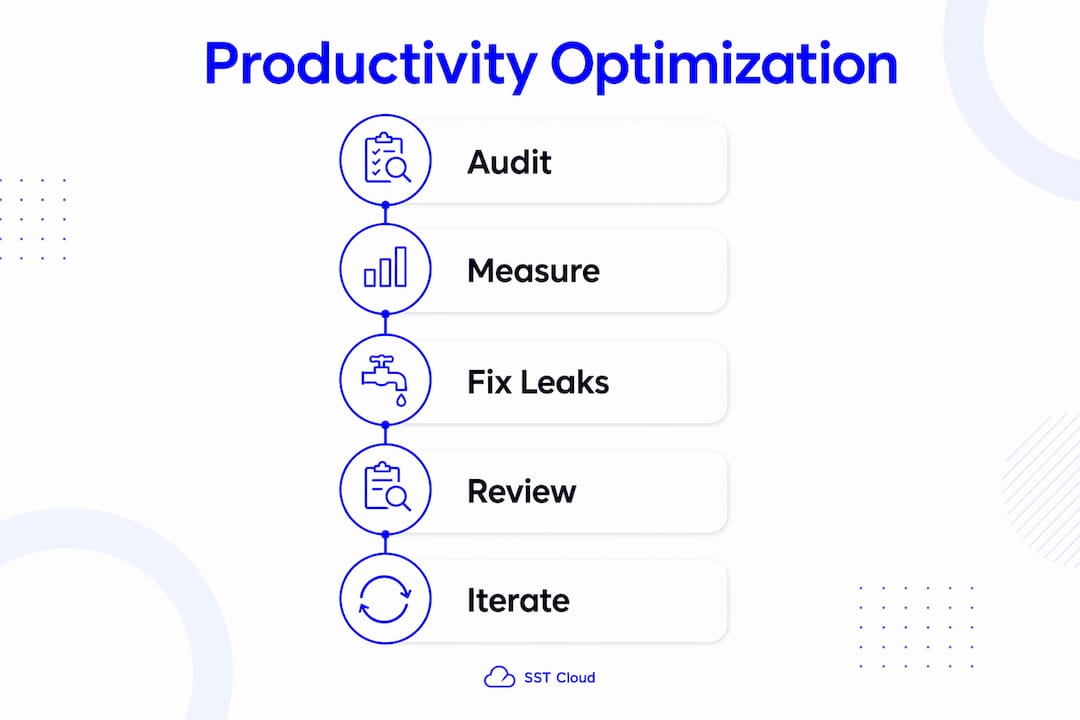
Cancelling one recurring meeting and protecting two hours of daily focus time closes 30–40% of meeting overload leaks within the first week. That is the fastest return available in any productivity audit.
Key takeaways
Remote team productivity optimisation works when managers design explicit systems around async-first communication, outcome-based metrics, and protected deep-work time rather than adding tools or increasing oversight.
Point | Details |
|---|---|
Build a remote team operating system | Define synchrony ratio, decision logs, and a knowledge base before adding any new tool. |
Measure outcomes, not activity | Track weekly deliverables, OKRs, and decision velocity instead of hours online or keystrokes. |
Protect deep-focus time | Block two or more hours daily per person and cap meeting hours at 10 per week. |
Leverage experienced team members | Pair them with new hires and create async knowledge surfaces to multiply their impact. |
Audit for productivity leaks regularly | Rank leaks by financial impact, assign an owner, and fix the highest-cost leak first. |
What I have learned from building remote team systems that actually last
The most common mistake I see managers make is treating remote productivity as a tool problem. They buy a new project management platform, add an AI notetaker, and wonder why output does not improve. The real problem is almost always system design, not infrastructure. A team with clear async norms, documented decisions, and protected focus time will outperform a team with premium tooling and no operating rhythm every time.
The second mistake is meeting proliferation disguised as alignment. When managers feel disconnected from their teams, the instinct is to schedule more check-ins. This is the wrong response. What actually builds alignment is a well-maintained performance framework with visible OKRs and a weekly async update that everyone reads. More meetings signal a system problem, not a solution.
Surveillance culture is the third failure mode, and it is the most damaging. Monitoring keystrokes or requiring cameras on during calls tells your team you do not trust them. That message travels fast and stays long after the policy is removed.
What does work is consistent 1-on-1s where the direct report owns the agenda, focused on coaching rather than status updates. These should never be cancelled two weeks in a row. They are the primary trust-building mechanism in a remote context, and skipping them is the fastest way to lose high performers.
The teams that sustain productivity gains over 12 months or more share one trait: leadership that treats the operating system as a living product. They review it, iterate on it, and remove things that no longer serve the team. That discipline, more than any single tactic, is what separates high-performing remote teams from the rest.
— Engineering and Growth Manager
How SST Cloud supports remote team performance at scale
Remote team productivity depends on the technology layer beneath it. When collaboration tools, data pipelines, and cloud infrastructure are fragmented or poorly governed, even the best async processes break down.
SST Cloud’s digital and cloud transformation services help engineering and operations teams consolidate their tooling, modernise their platforms, and build the infrastructure that async-first workflows require. From cloud migration and DevOps automation to managed services and AI integration, SST Cloud partners with small to medium enterprises to reduce technical complexity and give distributed teams the reliable, well-governed environment they need to perform. Speak with the SST Cloud team to assess where your current cloud setup is creating friction for your remote workforce.
FAQ
What is remote team productivity optimisation?
Remote team productivity optimisation is the practice of designing workflows, communication rhythms, and performance metrics to maximise output in virtual teams. It prioritises system design over surveillance or tool accumulation.
What is the ideal async-to-sync ratio for remote teams?
The recommended ratio is 70% async to 30% synchronous communication. High-performing distributed teams limit synchronous meetings to 8–10 hours per week, compared to a market average of 14.8 hours.
How should managers measure remote team performance?
Managers should track outcome-based metrics such as weekly deliverables, OKRs, and decision velocity rather than activity metrics like hours logged or keystrokes, which create distrust without improving output.
How do experienced team members affect remote productivity?
Experienced teammates raise individual productivity by approximately 12.2% on average, with new hires seeing a 26.2% boost. The effect comes from targeted knowledge transfer, not high communication volume.
What is the fastest way to fix a remote team productivity leak?
Cancelling one recurring meeting and protecting two hours of daily focus time closes 30–40% of meeting overload leaks within the first week, making it the highest-return intervention available.