Knowledge Base
Reduce downtime during cloud migration: a practical guide
Learn how to reduce downtime during cloud migration with practical strategies that enhance efficiency and minimize business disruptions.

Reduce downtime during cloud migration: a practical guide
Downtime during cloud migration is defined as any period when production systems become unavailable or degraded because workloads are in transit between environments. For IT managers at small to medium enterprises, even a few hours of unplanned outage can trigger financial penalties, erode customer trust, and stall business operations. Industry benchmarks recommend a recovery time objective under 4 minutes for Tier-1 workloads. Exceeding that threshold almost always points to excessive manual processes at cutover. Organisations that apply generative AI to automated discovery and planning can reduce migration timelines by 30–40%, compressing what once took 33 months down to 22. The strategies in this guide cover pre-migration planning, execution methodology, and post-migration cloud optimisation so your team can move fast without breaking things.
What prerequisites and planning steps are crucial to minimise downtime during cloud migration?
Pre-migration planning is the single greatest determinant of whether a migration succeeds or fails. Teams that skip formal discovery consistently encounter hidden dependencies mid-project, which causes scope creep and unplanned outages. Incomplete dependency mapping is the leading cause of escalation during live migrations. Starting formal dependency mapping at least 30 days before cutover gives your team time to surface those surprises before they become incidents.
A thorough pre-migration checklist covers five areas:
Complete workload inventory. Catalogue every application, database, and service in scope. Use actual utilisation data, not theoretical capacity, to size cloud instances correctly from day one.
Dependency mapping. Document all upstream and downstream service relationships, including DNS entries, firewall rules, and API endpoints. Tools like AWS Application Discovery Service automate much of this work.
Network architecture design. Define subnet layouts, security groups, and routing tables before migration begins. Network migration treated as an afterthought causes firewall and DNS delays that stall cutover at the worst possible moment.
Cutover criteria. Write explicit pass/fail conditions that must be met before traffic flips. Assign a named owner for each criterion so there is no ambiguity on the day.
Day 2 operational ownership. Assign teams responsible for monitoring, patching, and cost management before go-live, not after. Gaps in ownership are a common cause of post-migration drift.
Pro Tip: Use Infrastructure as Code tools like Terraform to pre-build your target environment and validate it against a staging replica before any production traffic moves. This catches configuration errors days before they can cause downtime.
Generative AI tools are now accelerating the discovery phase significantly. AWS Transform, for example, analyses existing codebases and infrastructure to produce dependency maps and migration wave plans automatically. Teams that adopt this approach spend less time on manual spreadsheet audits and more time validating the output.

Which migration methods effectively reduce downtime?
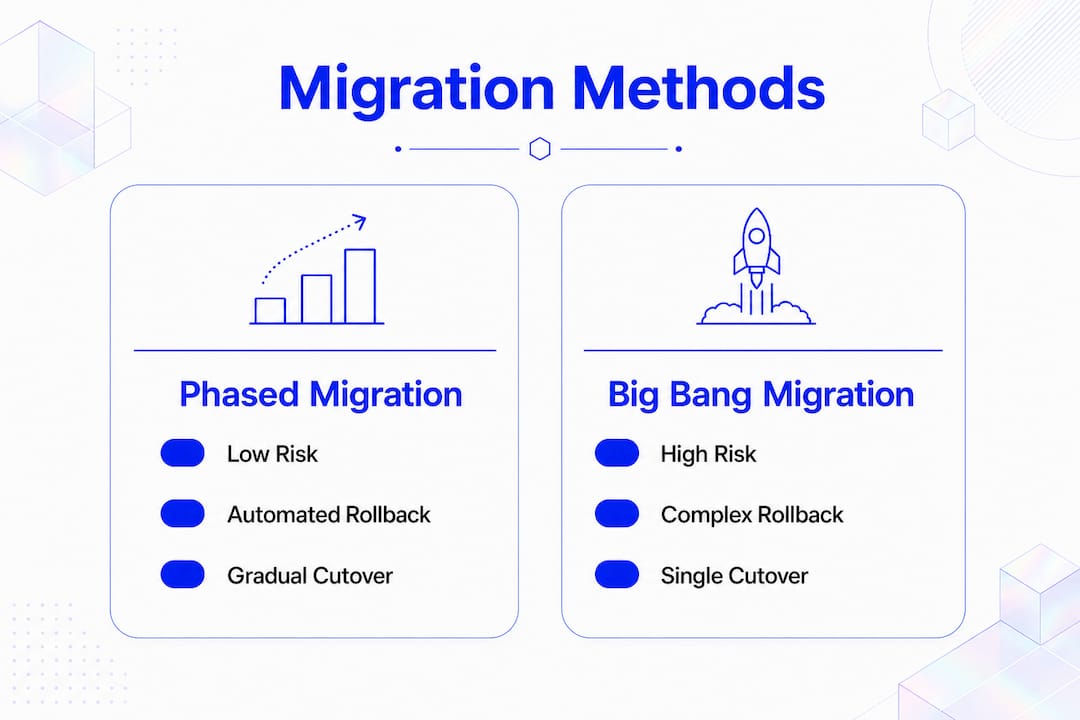
The choice of migration method determines how much risk your team carries at cutover. A “big bang” migration moves all workloads simultaneously. It is fast to plan but catastrophic when something goes wrong, because there is no partial rollback. Phased migration reduces risk by moving smaller workload groups in sequence, which makes troubleshooting faster and limits the blast radius of any single failure.
The most effective execution strategies for minimising downtime are:
Parallel environments. Run the source and target environments simultaneously under real traffic. This validates performance and behaviour before the final cutover flip.
Dual-write architecture. Write data to both source and target systems concurrently. Combined with change data capture tools, this approach reduces cutover downtime to minutes or seconds because the target is already current when traffic switches.
Blue-green deployments. Maintain two identical production environments. Traffic routes to the green environment while blue remains on standby. A failed deployment rolls back instantly by redirecting traffic.
Automated validation pipelines. Automated parity and schema drift checks gate the cutover decision. Manual validation introduces human error and delays; automated gates do not.
Documented cutover runbooks. Every step, every command, and every rollback trigger must be written down and rehearsed. A runbook that exists only in someone’s head is not a runbook.
Pro Tip: Keep your source system writable for at least 72 hours after cutover. Automated rollback criteria prevent emotional decision-making during an incident and give your team a clean, fast path back if something unexpected surfaces.
The table below compares the two most common migration approaches across key risk dimensions.
Dimension | Phased migration | Big bang migration |
|---|---|---|
Rollback complexity | Low. Each wave rolls back independently. | High. Full environment must revert simultaneously. |
Blast radius of failure | Limited to the current wave. | Entire workload portfolio. |
Cutover window required | Short per wave. | Long single window. |
Troubleshooting speed | Fast. Smaller scope per incident. | Slow. All issues surface at once. |
Recommended for SMEs | Yes. Matches typical team capacity. | Only for very simple, stateless workloads. |
Phased migration combined with blue-green deployments and automated rollback pipelines represents the lowest-risk path for most small to medium enterprises. The additional planning effort pays back immediately when the first wave goes live without incident.
How to monitor and optimise cloud environments post-migration
Post-migration cloud optimisation is where most teams leave money and reliability on the table. About 32% of cloud spend is wasted on idle or over-provisioned resources. Addressing this waste through right-sizing and scheduling can reduce cloud costs by 30–60% compared to legacy over-provisioned specs.
The first 30 days after cutover are the highest-risk period for both performance issues and cost blowouts. Parallel environments left running after migration, forgotten test instances, and over-provisioned compute all accumulate charges silently. Scheduling weekly cost dashboard reviews for the first 30 days is the most direct way to catch these issues before they compound.
Effective post-migration practices include:
Native cost dashboards. AWS Cost Explorer, Azure Cost Management, and Google Cloud Billing all provide resource-level visibility. Review them weekly, not monthly.
Right-sizing compute. Compare actual CPU and memory utilisation against provisioned capacity. Downsize instances that run below 40% utilisation consistently.
Storage tiering. Move infrequently accessed data to lower-cost storage classes such as AWS S3 Intelligent-Tiering or Azure Cool Blob Storage.
Idle resource termination. Tag all resources at creation. Any untagged or idle resource older than 14 days is a candidate for termination.
Performance monitoring baselines. Establish latency, error rate, and throughput baselines within the first week. Deviations from baseline are early warnings of configuration drift.
Optimisation action | Typical outcome |
|---|---|
Right-sizing over-provisioned instances | Reduces compute costs materially |
Terminating idle parallel environments | Eliminates duplicate spend immediately |
Applying storage tiering | Lowers storage costs for cold data |
Scheduling weekly cost reviews | Prevents cost blowouts in first 30 days |
Microservices architecture also supports ongoing optimisation. Decomposing monolithic applications into independently deployable services allows teams to scale and right-size individual components rather than entire application stacks. This is a medium-term investment that pays dividends in both cost and resilience.
What common pitfalls cause downtime during migration?
The most damaging migration failures share a common pattern: they were predictable. Secondary dependencies discovered mid-migration are the primary cause of scope creep and unplanned outages. A service that appears standalone in a spreadsheet often has undocumented connections to authentication services, logging agents, or third-party APIs that only surface when the service is moved.
Common pitfalls and their mitigations:
Incomplete dependency mapping. Run automated discovery tools 30 days before migration. Validate the output against application owners, not just infrastructure diagrams.
Network migration treated as a last-minute task. Firewall rules and DNS changes take time to propagate and validate. Design the network architecture as a parallel workstream from the start of the project.
No defined rollback criteria. Teams without written rollback triggers make decisions under pressure based on instinct. Automated rollback pipelines remove that risk entirely.
Operational ownership gaps. If no team owns monitoring and incident response on Day 1 post-cutover, issues go undetected. Assign ownership before go-live, not during the first incident.
Migrations scheduled during peak hours. Cutover windows should align with the lowest traffic period for the affected systems. For most Australian businesses, this means late Sunday night or a public holiday window.
Phased migration allows teams to refine their processes on lower-risk systems before moving critical workloads. This approach reduces downtime because each wave is smaller, better understood, and easier to roll back than a full-environment cutover.
Avoiding these pitfalls is not complicated. It requires discipline, documentation, and the willingness to delay a migration wave when the pre-conditions are not fully met. Teams that learn from common migration failures before they start are far better positioned to execute without incident.
Key takeaways
Reducing downtime during cloud migration requires formal dependency mapping, phased execution, automated validation, and disciplined post-migration cost reviews completed within the first 30 days.
Point | Details |
|---|---|
Start dependency mapping early | Begin formal discovery at least 30 days before cutover to surface hidden dependencies. |
Choose phased over big bang | Phased migration limits blast radius and makes rollback faster and simpler. |
Automate validation and rollback | Automated parity checks and rollback triggers remove human error from cutover decisions. |
Keep source writable post-cutover | Maintain a writable source system for 72 hours to enable fast rollback if issues emerge. |
Review costs weekly for 30 days | Weekly cost reviews in the first month prevent idle resources from compounding spend. |
What I have learned from migrations that almost went wrong
The migrations I have seen fail most spectacularly were not the ones with the most complex technology. They were the ones where the team was confident they already knew the environment well enough to skip formal discovery. That confidence is almost always misplaced.
Dependency mapping feels like overhead until you are three hours into a cutover window and discover that a payment processing service has an undocumented connection to an on-premises authentication server that nobody knew existed. At that point, the runbook is useless and the rollback decision becomes political rather than technical. Automated discovery tools, combined with a 30-day pre-migration window, make that scenario avoidable.
The second thing I would push back on is the assumption that post-migration optimisation can wait. Teams celebrate a successful cutover and then leave parallel environments running for weeks. Those forgotten instances are not just a cost problem. They are a security and compliance risk. Scheduling cost reviews as a calendar event in the first week after go-live is not optional; it is part of the migration itself.
Finally, phased migration is not just a risk management technique. It is a learning mechanism. The first wave teaches your team how the target environment actually behaves under production load. Every subsequent wave benefits from that knowledge. Teams that modernise without disrupting core systems consistently use this approach, and the results speak for themselves.
— Engineering and Growth Manager
How SST Cloud supports low-downtime cloud migration
SST Cloud works with small to medium enterprises across AWS, Microsoft Azure, and Google Cloud Platform to plan, execute, and optimise cloud migrations with minimal disruption to production systems.
SST Cloud’s digital and cloud transformation services cover the full migration lifecycle: workload discovery, dependency mapping, phased execution planning, automated validation pipelines, and post-migration cost optimisation. For teams that need ongoing support after go-live, SST Cloud’s managed cloud services provide continuous monitoring, right-sizing, and incident response. If your team is preparing for a migration and wants a structured approach that reduces risk at every phase, contact SST Cloud to discuss your environment.
FAQ
What is the recommended recovery time objective for cloud migration?
A recovery time objective under 4 minutes is the benchmark for high-performance Tier-1 workloads. Exceeding this threshold typically indicates too many manual steps in the cutover process.
Why does phased migration reduce downtime compared to big bang migration?
Phased migration moves smaller workload groups in sequence, which limits the blast radius of any failure and makes rollback faster. Each wave is independently recoverable, unlike a full-environment cutover.
How long should the source system remain writable after cutover?
The source system should remain writable for at least 72 hours post-cutover. This window allows automated rollback triggers to execute cleanly if unexpected issues surface in the target environment.
What causes the most unexpected downtime during cloud migration?
Incomplete dependency mapping is the primary cause. Secondary service connections that are undocumented in infrastructure diagrams surface mid-migration and force unplanned scope changes or rollbacks.
When should post-migration cost reviews begin?
Cost reviews should begin within the first week after cutover and run weekly for at least 30 days. This cadence catches idle parallel environments and over-provisioned instances before they generate significant waste.